


n8n
n8n is a workflow automation tool you can use in n8n's cloud or host yourself. Learn how its workflows and executions work, what its fair-code licence allows, and what self-hosting really involves.
At a glance
- Category
- Workflow automation
- Free plan
- Yes: self-hosted Community edition only
- Free trial
- Yes
- Pricing
- Checked
- Official website
- n8n.io
Summary
Who it may suit
- Technical users and developers who want to add JavaScript or Python steps to visual workflows
- Teams that want to run automation on their own infrastructure and have the skills to maintain it
- Builders of long, multi-step workflows, since n8n prices by execution rather than by step
- Beginners willing to learn, ideally starting with n8n Cloud rather than self-hosting
Key features
- A visual editor where workflows are built from nodes, starting with a trigger
- A Code node for custom JavaScript or Python steps
- An HTTP Request node for any app or service with a REST API
- Triggers for schedules, webhooks and app events
- Sub-workflows for reusing logic, which don't count towards execution limits
- Error workflows that start with an Error Trigger, for example to send alerts when a run fails
- AI workflows with language model providers, agents, tools, memory and MCP servers
- A choice of n8n Cloud (managed by n8n) or self-hosting on your own infrastructure
- Verified community nodes, plus unverified community nodes when self-hosted
Limitations
- The Sustainable Use License restricts how n8n may be used and shared, so it isn't open source in the conventional sense
- Self-hosting needs technical skills, and you provide, secure and maintain the infrastructure
- The free self-hosted Community edition lacks features such as SSO, projects, environments, Git version control and sharing of workflows and credentials
- n8n Cloud plans cap concurrent executions and execution time (5 minutes on Starter, 40 minutes on Pro, per the pricing page)
- On n8n Cloud, executions beyond the monthly allowance fail with an error until the allowance resets on the 1st of the month or you upgrade; they aren't queued or re-run
- On n8n Cloud, the Code node can import only the crypto and moment modules, and unverified community nodes aren't available
- Scheduled triggers count as an execution every time they fire, whatever the outcome
What n8n is
n8n is a workflow automation tool that combines a visual editor with the option to write code. You build workflows from nodes: each node is a step, such as receiving a webhook, reading a spreadsheet, calling an API or running a few lines of JavaScript.
You can use it in two very different ways. n8n Cloud is run for you by n8n. Self-hosted n8n runs on your own servers, where you're responsible for keeping it running. Much of what follows depends on which you choose.
n8n describes itself as fair-code. Its source code is public, but its licence limits how it can be used and shared (see Licensing below), so it isn't open source in the conventional sense.
Is n8n free?
There is no free n8n Cloud plan. n8n Cloud is paid, after a free trial.
The free option is the self-hosted Community edition: you can download and run n8n on your own infrastructure without paying n8n a licence fee. That is not the same as free to run. You pay for the servers and database it needs, and someone with technical skills has to install, secure, update and back it up. The Community edition also lacks some features of the paid plans, and its use is governed by the Sustainable Use License (both explained below).
How n8n workflows work
- A trigger starts each workflow: a schedule, a webhook call from another service, or an event in a connected app.
- Nodes do the work. Built-in nodes connect to many apps. The HTTP Request node reaches any service with a REST API, and the Code node runs custom JavaScript or Python as a step.
- Sub-workflows let one workflow call another, so shared logic can be reused.
- Error workflows start with an Error Trigger and run when another workflow fails, for example to send an email or chat alert.
- AI workflows can use language model providers, agents, tools, memory and MCP servers.
Example 1: contact form to follow-up task
- Webhook trigger: a website form sends each new enquiry to n8n.
- A node adds the enquiry to a spreadsheet.
- A node posts a message in the team's chat app.
- A node creates a follow-up task in a task manager.
Each enquiry is one execution, however many nodes it passes through, assuming the enquiry triggers one production run of this workflow and nothing else is counted separately.
Example 2: a nightly data job with code
- Schedule trigger: runs once a night.
- HTTP Request node: fetches the day's orders from an online shop's API.
- Code node: a short JavaScript step totals the orders by product.
- Nodes write the totals to a database and post a summary in a chat channel.
This is the kind of workflow where n8n's mix of visual nodes and code is most useful. It assumes someone is comfortable reading API documentation and writing a little code.
How executions are counted
n8n Cloud plans are priced by workflow executions. n8n's pricing page defines one as "a single run of your entire workflow", regardless of how many steps it has or how much data it processes. According to n8n's documentation:
- Only production executions count. Running a workflow from the editor while you build or test it doesn't count.
- Scheduled triggers count every time they fire, whatever the outcome. A schedule that runs hourly uses about 720 executions in a 30-day month.
- Webhook triggers count once per incoming request that starts the workflow.
- Polling triggers count only when they find new data.
- Sub-workflows and error workflows don't count. Only the parent (top-level) execution counts.
Failed runs. n8n's help centre says failed executions don't count against your execution quota. Its execution documentation still says a Schedule Trigger counts "regardless of outcome", so it isn't completely clear whether a scheduled run that fails is counted. If failures are common in your workflows, check the usage n8n reports.
Reaching your limit on n8n Cloud. According to n8n's help centre, once a Cloud plan's monthly allowance is used up, each new execution fails straight away with an "Execution limit reached" error. Executions aren't queued and don't re-run later, though your workflows stay active. Allowances reset on the 1st of each calendar month, whatever your billing date. The 50,000-execution Pro option on monthly billing can buy extra executions; other Cloud plans upgrade instead. This is different from n8n's self-hosted Business plan, where n8n's pricing page says workflows keep running and extra executions are charged.
In Example 1, 200 enquiries in a month would use about 200 executions, whether the workflow has four nodes or forty. That assumes each enquiry starts one production run of this one workflow, and that no other workflows (for example additional scheduled or webhook workflows) are counted alongside it. That differs from tools that bill per step, such as Make, which bills in credits used as each module runs. Our guide to automation usage works through this example on Zapier, Make and n8n.
These figures are illustrative, worked out from n8n's published rules rather than measured. Real counts depend on how your workflows are triggered and built, and n8n's own usage figures are the final word.
n8n Cloud or self-hosted?
n8n Cloud is fully managed. n8n handles hosting, updates and scaling, and no technical expertise is needed to start. Cloud plans set limits on monthly executions, concurrent executions and how long a single execution may run. There are also some technical restrictions: the Code node can import only the crypto and moment modules, and unverified community nodes aren't available.
Self-hosting puts n8n on infrastructure you choose: your own servers, on-premises or a private cloud. n8n's documentation says technical expertise is required to install and configure it, that you must provide and manage the infrastructure, and that maintenance is your responsibility. In practice that includes:
- Server and database costs, plus the time to run them. Self-hosting doesn't need a paid n8n licence for the Community edition, but it isn't free to operate.
- Security: n8n's guide to securing self-hosted instances covers setting up SSL, single sign-on, two-factor authentication, restricting nodes and the public API, isolating Code node executions, controlling outbound connections, rotating encryption keys and running security audits.
- Updates, backups and monitoring, all handled by you.
Editions when self-hosting. The free Community edition omits features including SSO, projects, environments, log streaming, external secrets, Git version control and sharing of workflows and credentials. Only the instance owner and the user who creates a workflow or credential can access it. Registering your Community edition with an email address unlocks a few extras (folders, debugging in the editor and custom execution data). The paid Business plan is self-hosted and adds features such as SSO, multiple environments, Git version control and queue mode.
A practical starting point. n8n's own guidance suggests Cloud if you want to start quickly or don't have technical expertise. Some people learn on Cloud first and move to self-hosting later if they need more control.
Licensing: the Sustainable Use License
The self-hosted version of n8n is distributed under the Sustainable Use License, which n8n's documentation also calls its Community license. The licence text says:
- you may use or modify n8n "only for your own internal business purposes or for non-commercial or personal use";
- you may distribute it or provide it to others "only if you do so free of charge for non-commercial purposes";
- files with ".ee." in their name are excluded and need a separate n8n Enterprise licence.
n8n's licence FAQ gives examples. Allowed: running n8n for your own business or personal projects, building automations for clients on your instance (as long as clients can't create or edit them), charging clients for setup, maintenance, training or consultancy, and embedding n8n behind the scenes where users trigger workflows you built. Not allowed: hosting n8n as a service that lets clients build workflows, letting external users build or configure workflows through your product, forking n8n to launch a competing automation product, and white-labelling n8n by removing its branding.
These lists summarise n8n's licence and its official licence FAQ. They aren't a complete statement of the terms and aren't legal advice. Read the licence text and the FAQ for yourself, and if your plans sit near any of these lines, contact n8n about licensing or take legal advice before you build.
Choosing a plan
n8n's pricing page lists Cloud plans (Starter and Pro), a self-hosted Business plan, an Enterprise plan for Cloud or self-hosted, and the free self-hosted Community edition. Pro comes in 10,000- and 50,000-execution options, and Business in several larger tiers.
n8n's pricing page shows prices in local currency depending on where you view it. The pricing section below shows two verified lists:
- Euros, from the page's default version, which shows annual billing only. These are monthly equivalents for a plan paid annually, not the price of a single month.
- Pounds, as the page shows them in the UK, for both monthly and annual billing. These are n8n's own pound prices, not conversions from euros.
We haven't seen n8n's monthly euro prices or US dollar plan prices, and the page doesn't say whether tax is included. Check current prices, billing options and how tax applies in your country on n8n's pricing page.
Before choosing:
- Estimate executions, not steps. Count production runs per month, remembering that every scheduled trigger fire counts.
- Check execution time and concurrency. Long or parallel workloads may need a higher plan.
- Price self-hosting honestly. Include servers, a database, backups and the time to maintain and secure them.
- Check the licence if you build for clients or inside a product.
- Try before buying. n8n says no credit card is needed for the Cloud trial, which includes 1,000 executions with a 180-second time limit per execution. The Business trial lasts 14 days and needs a card.
Our automation savings estimator helps you weigh the time a workflow saves against its running costs.
When n8n may not be the right choice
- You want no technical involvement at all. n8n Cloud removes server work, but building with n8n still rewards comfort with data structures, APIs and sometimes code.
- You can't commit to running servers. A self-hosted instance that isn't patched, secured and backed up is a risk. If nobody owns that work, use Cloud or a fully hosted tool.
- You plan to resell automation as a product. Letting customers build their own workflows, white-labelling or hosting n8n as a service isn't allowed under the Sustainable Use License without a separate agreement.
- You need features missing from the Community edition, such as SSO or shared credentials, but don't want a paid plan.
- Your runs are long or very frequent. Cloud execution-time limits apply, and an every-minute schedule uses executions around the clock.
Before you decide
- List the apps you need and check n8n has nodes for them, or that they have APIs the HTTP Request node can use.
- Decide between Cloud and self-hosting before building, based on who will maintain it. Our Make vs n8n and Zapier vs n8n comparisons set out the trade-offs, including worked usage examples.
- Map the workflow with our workflow planning checklist.
- Estimate monthly executions and compare with current plan limits.
Details in this profile come from n8n's website, documentation and licence, listed below. We haven't tested n8n ourselves for this profile, and features, limits and prices change, so confirm anything important with n8n directly.
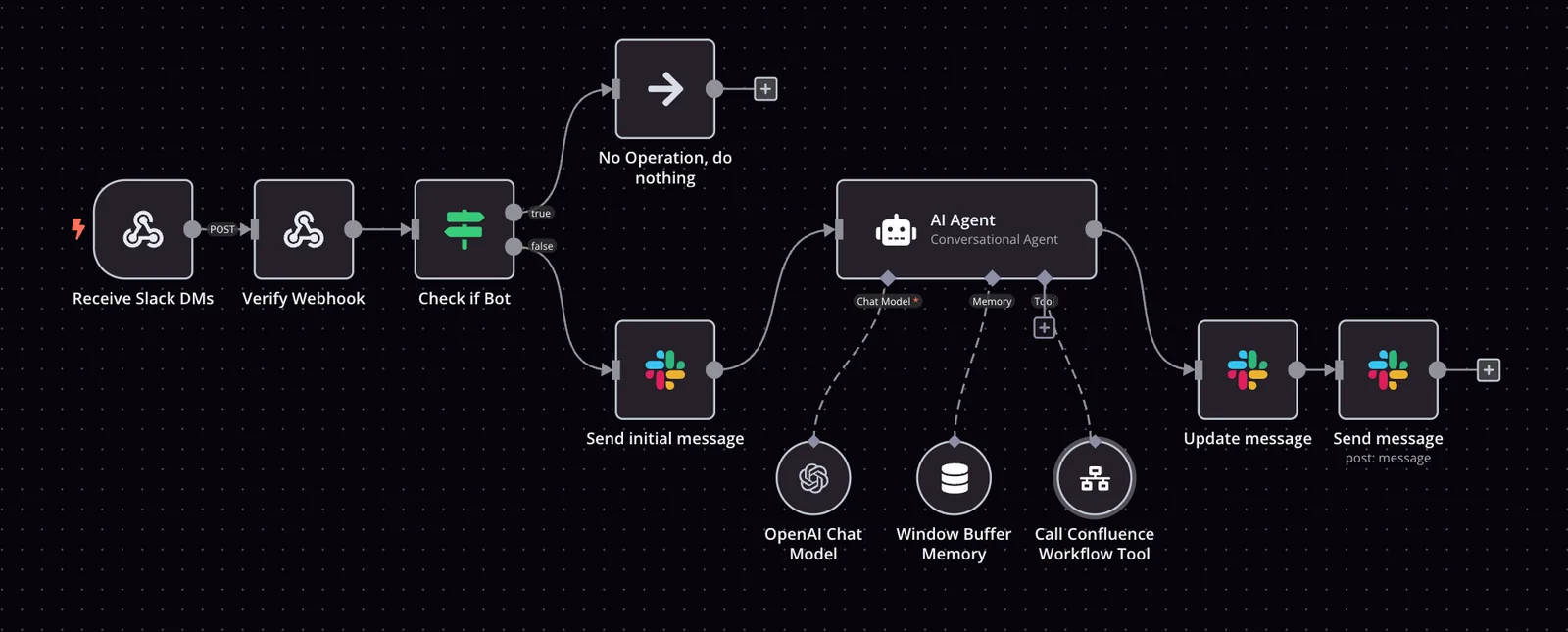
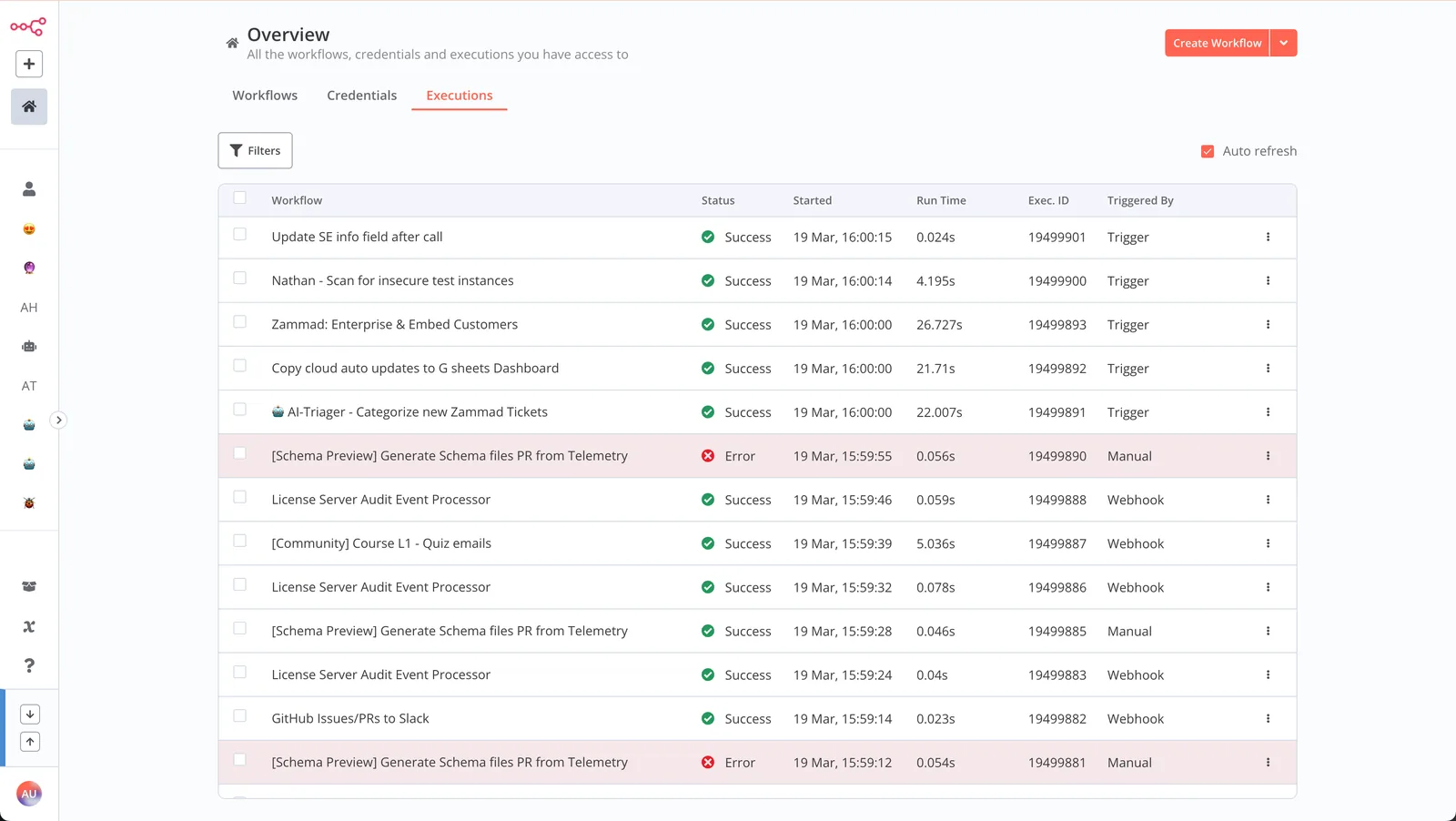
What n8n looks like
Screenshots published by n8n in its press kit. We didn’t capture them ourselves, and the interface may have changed since they were published.
Pricing
Standard prices (EUR)
| Plan | Price (EUR) | Details |
|---|---|---|
| Starter (Cloud), 2,500 executions (annual) | €20.00 per month, billed annually | Monthly equivalent with an annual commitment, not the price of a single month. |
| Pro (Cloud), 10,000 executions (annual) | €50.00 per month, billed annually | Monthly equivalent with an annual commitment, not the price of a single month. |
| Business (self-hosted only), 40,000 executions (annual) | €667.00 per month, billed annually | Monthly equivalent with an annual commitment. Self-hosted, so infrastructure costs are extra. |
| Enterprise (Cloud or self-hosted) | Contact sales | Contact n8n for pricing. |
The provider’s pricing page doesn’t say whether tax is included. Checked on against the provider’s pricing page. Prices can change, so confirm before buying.
These are the euro prices on the default version of n8n's pricing page, which shows annual billing only (n8n says annual billing saves 17%). Monthly-billing euro prices, the 50,000-execution Pro option and US dollar prices weren't shown to us. n8n's page shows prices in local currency depending on where you view it, so check it from your own country.
Prices in other regions (1)
Prices for the United Kingdom (GBP)
| Plan | Price (GBP) | Details |
|---|---|---|
| Starter (Cloud), 2,500 executions (annual) | £20.00 per month, billed annually | Monthly equivalent with an annual commitment. |
| Starter (Cloud), 2,500 executions (monthly) | £24.00 per month | Billed monthly. |
| Pro (Cloud), 10,000 executions (annual) | £50.00 per month, billed annually | Monthly equivalent with an annual commitment. |
| Pro (Cloud), 10,000 executions (monthly) | £60.00 per month | Billed monthly. |
| Pro (Cloud), 50,000 executions (annual) | £120.00 per month, billed annually | Monthly equivalent with an annual commitment. |
| Pro (Cloud), 50,000 executions (monthly) | £144.00 per month | Billed monthly. Extra executions can be added on this option (see the profile). |
| Business (self-hosted only), 40,000 executions (annual) | £569.00 per month, billed annually | Monthly equivalent with an annual commitment. Infrastructure costs are extra. |
| Business (self-hosted only), 40,000 executions (monthly) | £682.00 per month | Billed monthly. Infrastructure costs are extra. |
| Enterprise (Cloud or self-hosted) | Contact sales | Contact n8n for pricing. |
The provider’s pricing page doesn’t say whether tax is included. Checked on against the provider’s pricing page. Prices can change, so confirm before buying.
The pound prices n8n's pricing page shows when viewed from the UK. They are n8n's own prices in pounds, not conversions from euros. Business also comes in larger execution tiers at higher prices.
Availability by country
We haven’t checked availability in specific countries yet. Missing information doesn’t mean n8n is unavailable: confirm with the provider.
Related guides
Comparisons
Make vs n8n: Pricing, Self-Hosting, Features and Which to Choose
Make and n8n both build visual, multi-step automations, but they count usage, host your data and license their software very differently. Here is how they compare, from official sources.
Zapier vs n8n: Pricing, Features, Self-Hosting and Which to Choose
Zapier and n8n both automate work across apps, but Zapier counts each successful action while n8n counts whole workflow runs and can run on your own servers. Here is how they compare, from official sources.
More workflow automation software

Make
Make is a hosted workflow automation platform where you build multi-step "scenarios" on a visual canvas. Learn how it works, how credits are counted, who it suits and where it may not be the right fit.

Zapier
Zapier is a hosted, no-code automation tool that connects apps through trigger-and-action workflows called Zaps. Learn how Zaps and tasks work, what the free plan really includes, and when Zapier may not suit you.
About this page
- Published
- Updated
Sources
- n8n: Plans and pricing (accessed )
- n8n Docs: Understand executions (accessed )
- n8n Help Center: Can you reset my executions? (what happens at the execution limit) (accessed )
- n8n Help Center: How can I add more workflow executions? (accessed )
- n8n Docs: Sub-workflows (accessed )
- n8n Docs: Error handling (accessed )
- n8n Docs: Choose how to use n8n (accessed )
- n8n Docs: Compare editions (Community edition features) (accessed )
- n8n Docs: Securing n8n (accessed )
- n8n Docs: Code node (accessed )
- n8n Docs: HTTP Request node (accessed )
- n8n Docs: Install and manage community nodes (accessed )
- n8n Docs: Advanced AI (accessed )
- n8n Docs: Community license FAQ (accessed )
- n8n on GitHub: LICENSE.md (Sustainable Use License) (accessed )
- n8n on GitHub: repository overview (accessed )
Facts on this page come from the sources listed above. This page is not a recommendation or endorsement. Spotted something out of date? See our editorial policy.